For Behringer WING consoles

The whole console,
in your hand.

Wingman is a remote for the WING on iPad and iPhone. Mixing is free. Wingman Pro adds a second engineer that knows your board, tunes your room and rings out your wedges.

iPad & iPhone app coming soon to the App Store.

Pro Wingman Pro

A second engineer at the desk.

Pro adds an engineer who knows your board, your room and your people. It suggests and explains, and nothing reaches the console until you tap Apply.

Ask Wingman

Say what you hear. Wingman knows the board.

Type or say it the way you'd tell another engineer: “lead vocal's getting lost in the chorus”. Wingman works out which channel, why, and what to change.

  • Sees everything: every scribble strip, the loaded plugin models, meters, the channel RTA and your effects.
  • Knows what's on each channel, and reads your layout: parallel buses, subgroups, monitor mixes and effects returns.
  • Talks it through, one step at a time. It asks when it isn't sure and looks up gear it doesn't know.
  • Works across every console in the room. Each change is listed for your OK.
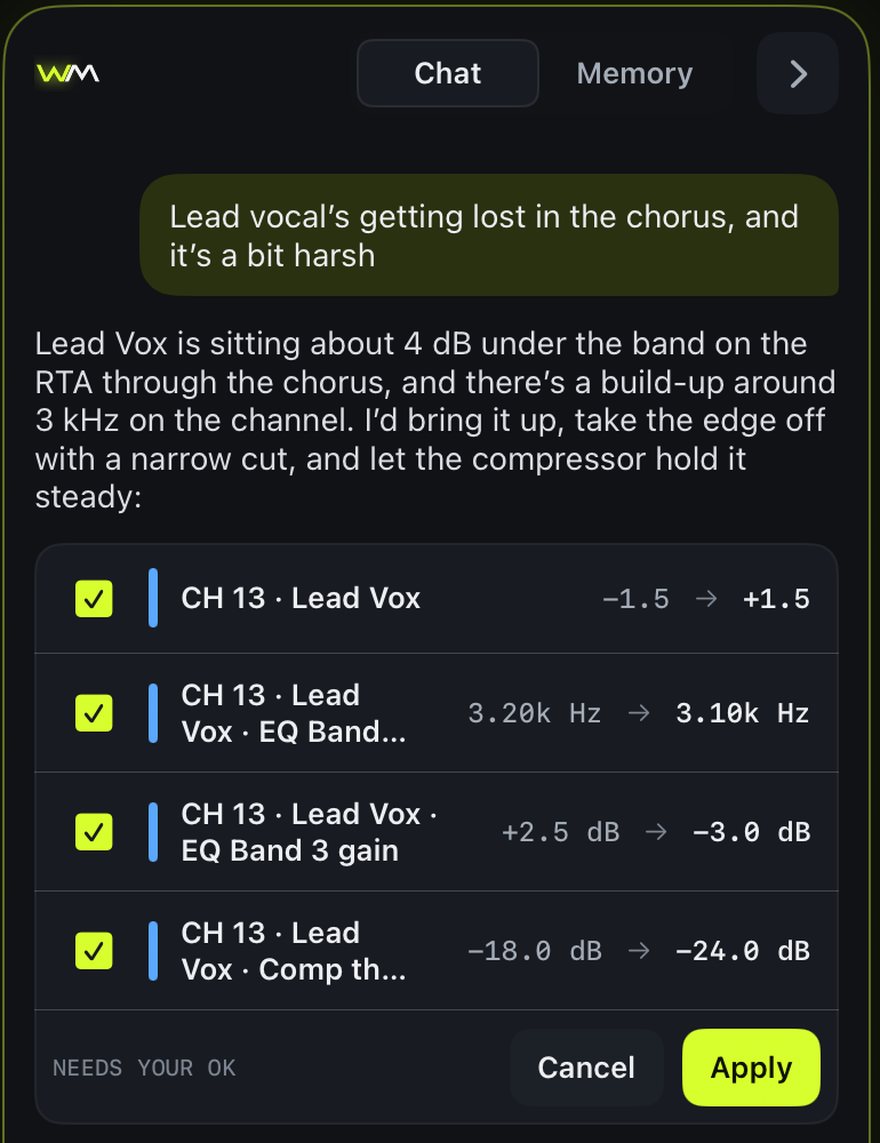
Ask Wingman on iPad: the lead vocal is 4 dB under the band, with a level, EQ and compressor change waiting for approval.

Intelligent EQ and dynamics

Pick a goal. See the fix before you take it.

Open a channel and tap what you're after. Wingman draws its EQ as a dashed curve over yours, and its compressor and gate settings on the transfer curves. Apply it, or don't.

Clean it upWarmerBrighterPunchierLess harshLess muddySit in the mixMore presence
CH 13 · Lead VoxLess harsh
1005002k8k
Band 3 · 3.1 kHz · −3.0 dB · Q 2.0Apply

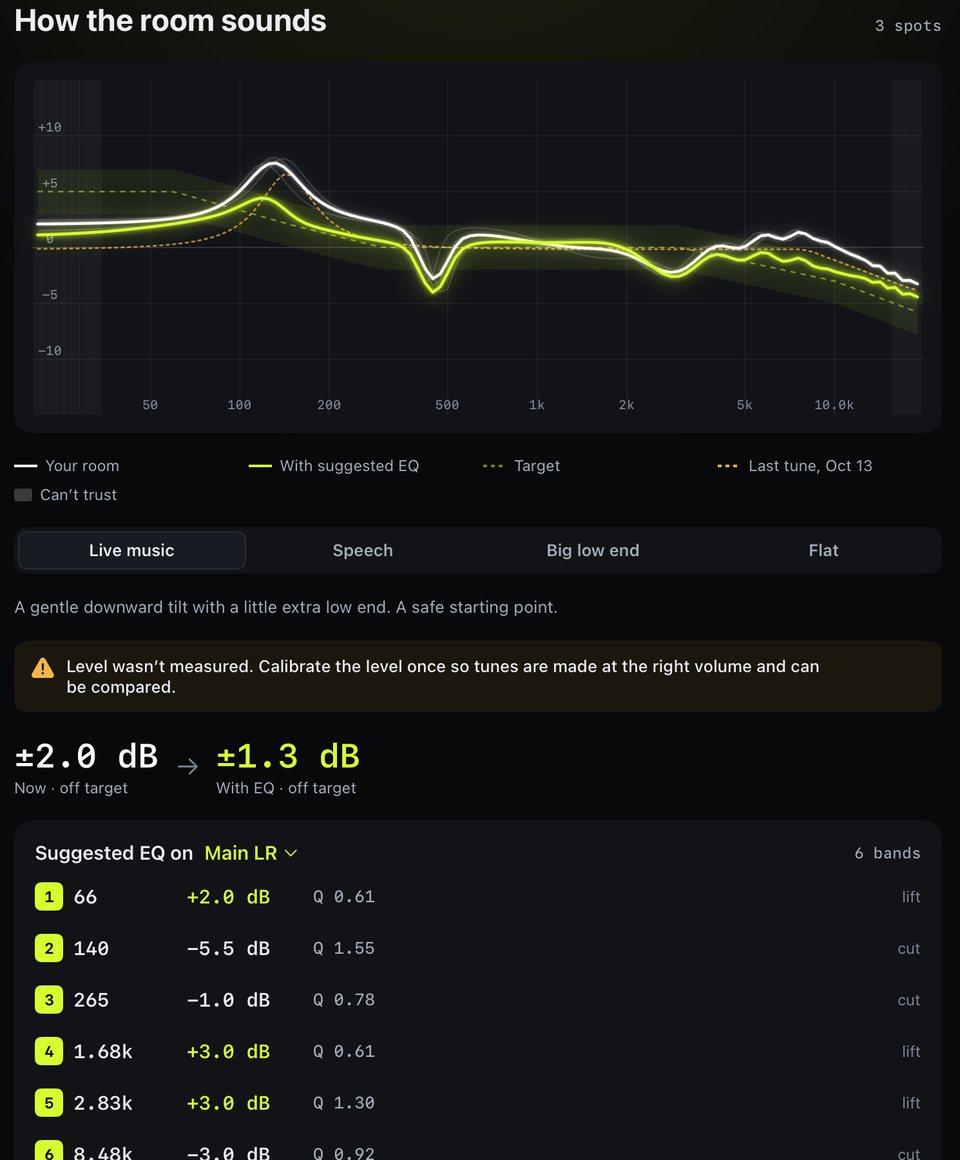
Room tuning and ring-out

Tune the room. Ring out the wedges.

  • Balance first: left against right, subs against tops, fixed with your OK.
  • Measure the PA with pink noise or a sweep from the WING's own oscillator, from one spot or several.
  • Apply main EQ against a target curve, with undo. Every room keeps its last 12 tunes to compare week to week.
  • Ring out monitors: Wingman raises the mix, catches feedback as it starts and notches it on the bus EQ.
  • Speaker check: play each speaker on its own to hear that it's working.
Room tuning results: the room's response against a target, and six suggested main EQ bands.

Rooms of consoles

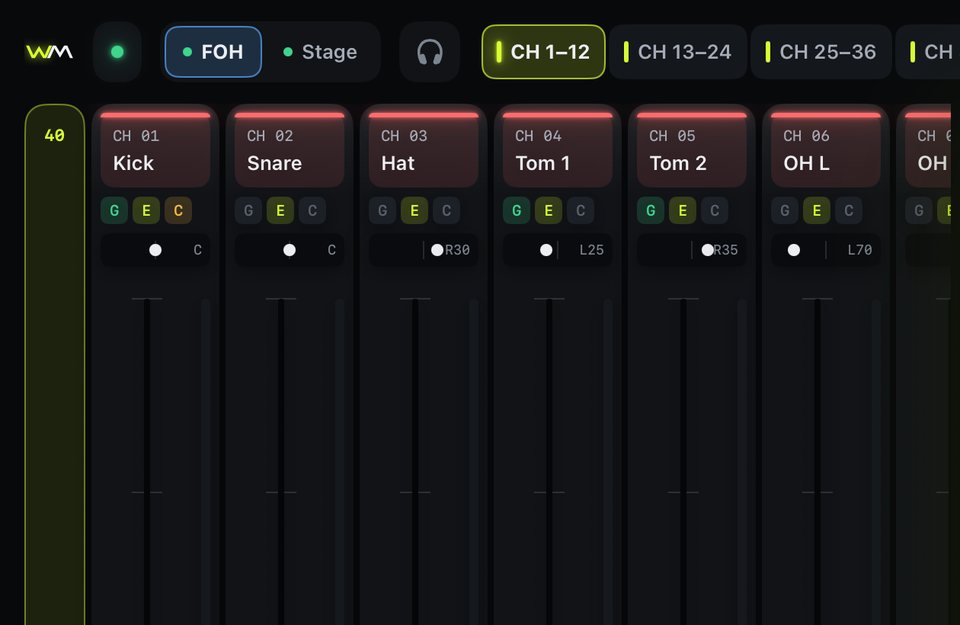
FOH and stage, one tap apart.

Put your boards in a room: front of house and the monitor console, or a stage rack. With Pro, every console in the room stays connected, so switching is instant and Ask Wingman can work across them all. Without Pro, rooms still group your boards, but switching reconnects.

The top bar with FOH and Stage consoles side by side.

Gain watch

Spots an input clipping and offers to turn the gain down, before anyone hears it twice.

Memory

Gets to know your venue, room and console, and each person's preferences in their mix.

Listen anywhere

Hear any Wingman Listen hub on your own phone, with wired earphones.

AI included

A monthly Wingman AI allowance covers normal use. No keys, no setup.

$7.99/month or $69.99/year

Team: Pro for up to 8 people, plus your own Listen hub, $29.99/month.

Compare plans

Free, for every mix

Everything at the desk, wherever you're standing.

Mixing and routing

Channels, aux, buses, matrices, mains and DCAs, with EQ, gate, compressor and sends. A signal‑flow map you can trace and patch by hand.

Sends on fader

On iPhone, tap a mix and the faders become its sends. Sixteen big bus tiles, one tap back.

See who else is mixing

Other Wingman users on the console show up by name, with tags on the faders they're touching.

Scenes

See the console's scene list and recall, next or previous from wherever you are.

Read‑only when you want it

One tap locks the board: Wingman watches, nothing reaches the console. Routing changes are confirmed and undoable.

Plays well with others

Uses the WING's native protocol, so it runs alongside Companion and other remotes without taking over their feedback.

Stays connected

Retries never stop, a watchdog catches a dead link in seconds, and the console is found again by name if its IP changes.

No account needed

Download, find your console, mix. An account only comes in when you go Pro.

Team Wingman Listen

In‑ears on the phones the band already has.

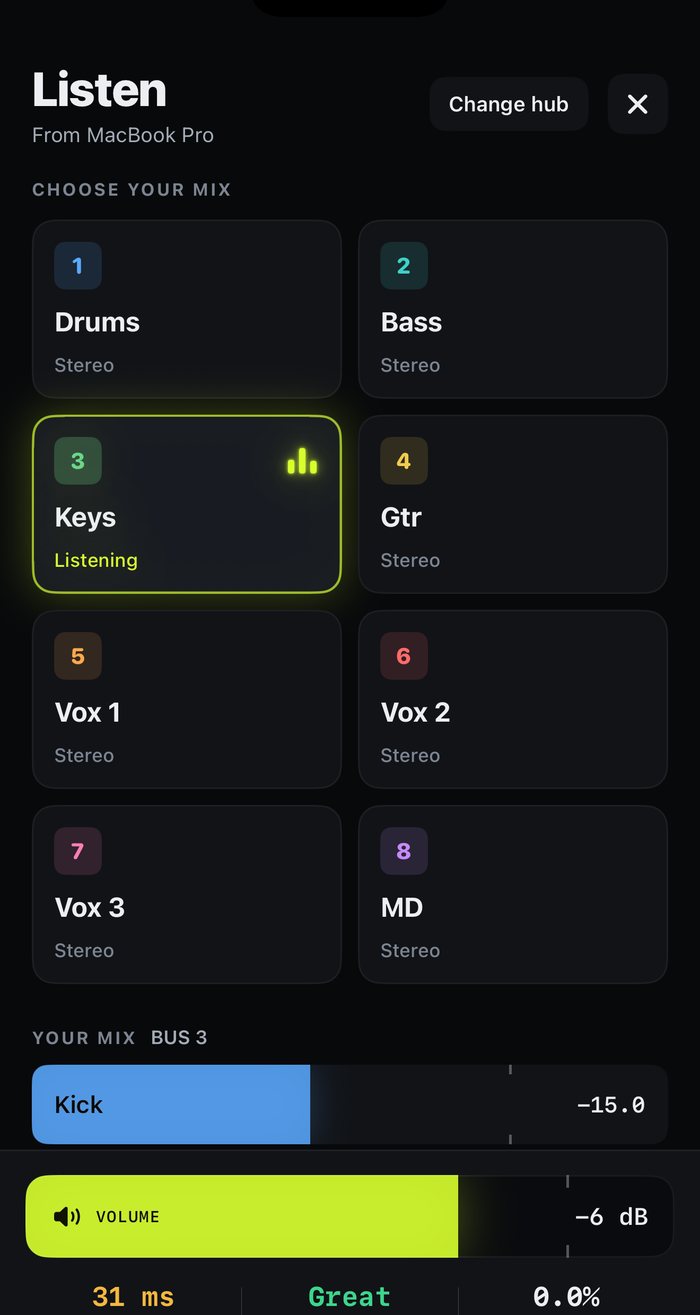
Wingman Hub, a free Mac app, takes up to eight mix buses from the WING over USB and streams them over WiFi. Musicians plug wired earphones into their phone, pick their mix and listen, with no account needed on their side.

  • 8 mixes, 8 phones per hub, low‑delay Opus.
  • Musicians adjust their own mix when you allow it, with one switch to lock everything.
  • Wireless solo: hear the console's solo on the iPad you're mixing from.
  • Room measuring with a measurement mic plugged into the Mac.

Running a hub is part of Team. Pro members can listen on any hub.

Wingman Listen on iPhone: eight mixes to choose from, with Keys selected and a volume slider.

Plans

Free to mix. Pro when you want help.

Free

$0

Forever, no account

  • The whole board, routing and scenes
  • Sends on fader and in‑ear mix control
  • See who else is mixing

Team

$29.99/mo

Up to 8 people

  • Pro for everyone on the team
  • Your own Wingman Listen hub
  • One shared AI allowance
FreeProTeam
Mixing, routing, scenes, sends on faderYesYesYes
See who else is mixingYesYesYes
Ask WingmanNoYesYes
Intelligent EQ and dynamicsNoYesYes
Room tuning, ring‑out, speaker checkNoYesYes
Gain watch and memoryNoYesYes
Rooms of consolesSwitching reconnectsAll connected, instantAll connected, instant
Listen on your phoneNoAny hubYour team's hub
Run a Wingman Listen hubNoNoYes
Wingman AI allowanceNoneMonthly, includedMonthly, shared by up to 8

Subscriptions are bought in the app and renew until cancelled in your Apple Account settings.

Get Wingman

Wingman Hub for Mac

Wire the Mac to the WING by Ethernet and USB, and leave it running at the desk.

Download for Mac

macOS 14 Sonoma or later · Apple silicon and Intel

Wingman for iPad and iPhone

The remote itself. Free on the App Store, with Pro and Team inside.

Coming soon to the App Store

iOS 17 or later